

H02 Radar Altimeter to the APM Flight Controller via CAN and UART
The H02 radar connects to the flight controller via CAN_NRA24.
Model: H02 -Detect range 0.3-200m

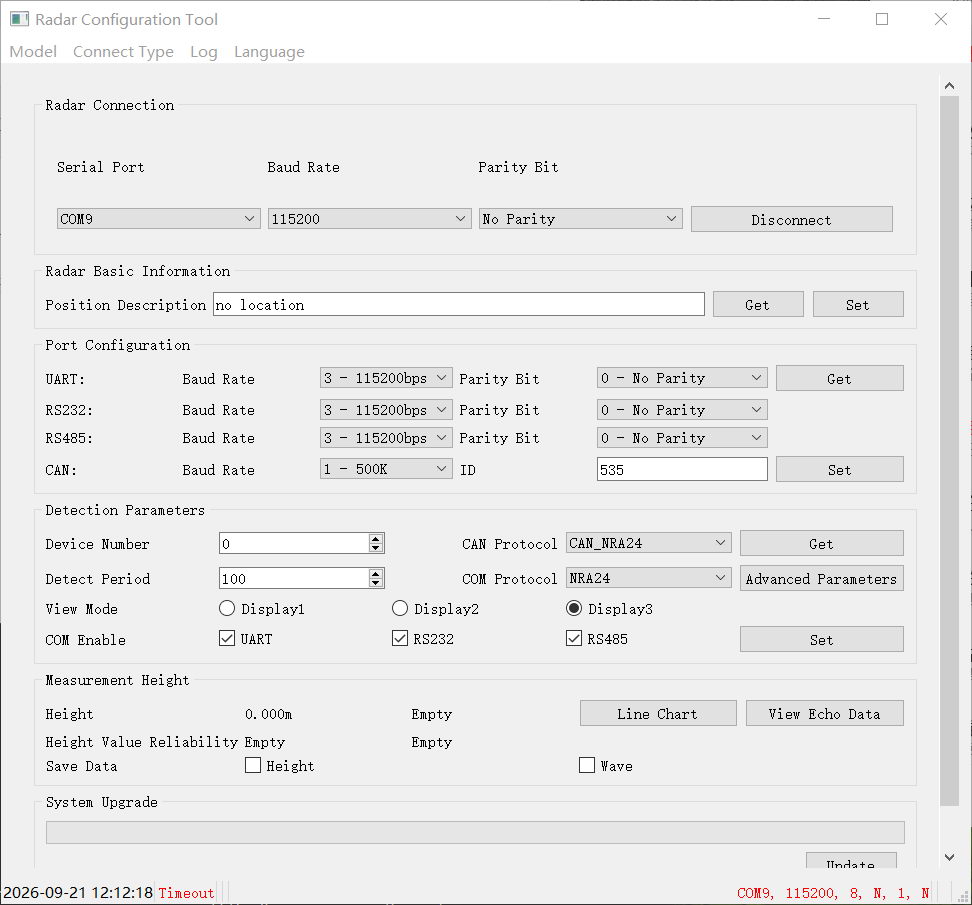
1. Check H02 Radar setting by the Radar Config Tool
Protocols select : CAN_NRA24(14),Baud rate:500K.
***[ Set under CAN or UART connection mode avaiable]
CAN:

UART:
2.APM
FC Model:pixhawk 6c mini
FC Firmware:4.6.3
2.1. Radar connect with CAN2,set parameter as:
CAN_P2_DRIVER:2(Second driver)
2.2. Continute set following parameter:
CAN_D2_PROTOCOL:14(RadarCAN)
CAN_P2_BITRATE:500000
RNGFND1_TYPE:39(NRA24_CAN)
2.3. Also following parameter:
RNGFND1_RECV_ID:0
RNGFND1_ORIENT:25
Detect range reference to radar spec:
RNGFND1_MIN_CM:(Mini detect range:cm)
RNGFND1_MAX_CM:(Max detect range:cm)


2.4. Check data in missionplan and test tool:

3. UART Connection Test:

3.1. Modify Radar Parameters by Radar Config Tool
Configure radar serial port: 115200 baud, 8 N 1; set protocol to TF03.

3.2. MissionPlanner Parameter Configuration
Set these parameters inside full parameter list:
RNGFND1_ORIENT = 25
RNGFND1_TYPE = 20
SERIAL2_PROTOCOL = 9
SERIAL2_BAUD = 115200
RNGFND1_MIN_CM = 30
RNGFND1_MAX_CM = 20000
Click Write Parameters and wait for refresh. Adjust SERIALx_BAUD according to actual wiring and radar baud rate setting.

